

How to Encode and Decode Base64 Without Corrupting Data
Encode UTF-8 text or files to Base64, decode back to text, and know when Base64 is the wrong tool.

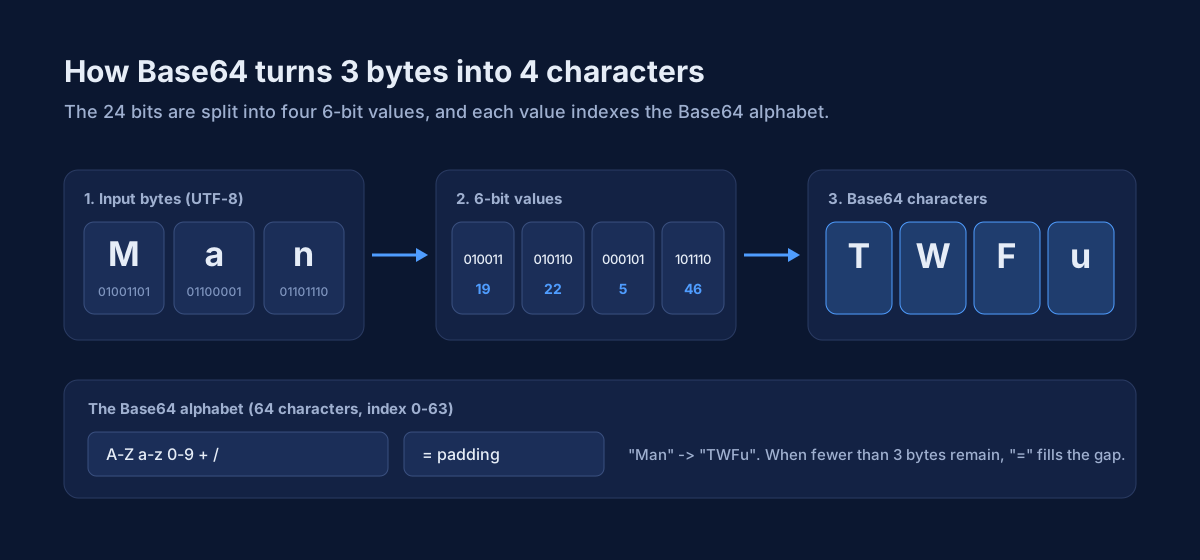
Base64 turns binary into ASCII-safe text so it can ride in JSON, email, or config files that dislike raw bytes, for example a binary blob embedded in a JSON API response. Base64 is a binary-to-text encoding defined by RFC 4648 that maps every 3 bytes to 4 printable characters. Encoding the wrong string, or treating Base64 as encryption, is a common way to ship corrupted payloads.
The Haivix Base64 Encoder works in the browser: encode UTF-8 text to Base64, decode Base64 to text, or drop a file to encode / paste Base64 to download decoded bytes as decoded.bin. Nothing is uploaded to Haivix.
Key takeaways
- Base64 is an encoding, not encryption or compression; anyone can reverse it.
- It makes the payload about a third larger in length, so it is the wrong choice when size matters.
- Encode text as UTF-8 bytes first, or non-Latin characters will be corrupted.
- Base64url swaps + and / for - and _ so the value is safe inside a URL or JWT.
- Round-trip a decode before shipping; the tool errors on invalid input rather than guessing.
Text vs file workflows
On the text tab, Encode uses a UTF-8-safe path into btoa. Decode reverses it with atob. UTF-8 is the byte encoding applied to text before Base64, and it is why non-Latin characters survive the trip. Invalid Base64 shows an error instead of silent garbage. Copy puts the result on the clipboard.
On the file tab, any dropped file becomes a Base64 string. Pasting Base64 and decoding downloads decoded.bin—the tool does not restore the original filename or MIME type. Large files are limited by browser memory; this is not a streaming ETL encoder.
How Base64 rearranges the bits
What Base64 is not
Base64 is encoding, not encryption or hashing. Anyone who can read the string can decode it, for example a token pasted into a public issue tracker. For checksums use the Hash Generator. For hex dumps use Hex Encoder/Decoder. Base64url is a Base64 variant with + and / replaced by - and _ so a value is safe inside a URL. JWT segments use it, so inspect those in JWT Studio rather than forcing classic Base64 here.
The tool does not emit full data: URIs, Base64URL mode, or live-as-you-type encode. Build data URIs in your app after you copy the string if you need them. The MDN Base64 glossary describes the alphabet and the padding rules behind both variants.
Base64, Base64url, and hex compared
| Encoding | Alphabet | Typical use |
|---|---|---|
| Base64 | A-Z, a-z, 0-9, +, / | Embedding bytes in JSON, email, or config. |
| Base64url | Base64 with - and _ instead of + and / | URLs, filenames, and JWT segments. |
| Hex | 0-9 and a-f | Short binary fields and checksum display. |
Checklist before you paste into production
Open the Base64 Encoder, choose text or file, encode or decode, then copy or download. Work stays in the current tab.
- You encoded the exact bytes or UTF-8 text you meant.
- Decode round-trips cleanly before you ship.
- You are not using Base64 as a secrecy control.
- File decodes were renamed from decoded.bin to the real type.
- Payload size is acceptable after the roughly 33% expansion that MDN documents.
About this guide
This guide is maintained by the Haivix editorial team. You can read more about us and how Haivix tests its tools on our about page, and send corrections through our contact page.